
Why Choose Duit Now for Top Ups at LUCKY TOWN PLUS?

Fast and Convenient QR Code Deposits for LUCKY TOWN PLUS Members
LUCKY TOWN PLUS offers Duit Now as a fast and highly convenient way to top up your account. Simply scan the provided QR code with your preferred payment app, complete the transfer, and your funds will be processed quickly. Duit Now at LUCKY TOWN PLUS supports multiple payment methods, including UPay and Go Pay.
Low Minimum Deposit to Start Playing at LUCKY TOWN PLUS
Start enjoying all the games and promotions at LUCKY TOWN PLUS with as little as a RM20 minimum deposit. Duit Now makes it easy for everyone to dive into the action without needing large upfront commitments.
Quick Processing Within 15 Minutes at LUCKY TOWN PLUS
Your deposits are processed promptly by the LUCKY TOWN PLUS system. Most transactions are completed within minutes, and you will receive a confirmation notification once your funds have been successfully credited to your account.
Two Duit Now Options Available at LUCKY TOWN PLUS

Option 1: UPay Duit Now at LUCKY TOWN PLUS
LUCKY TOWN PLUS supports UPay as a primary Duit Now payment method. Simply follow the UPay-specific steps outlined in the guide below for a smooth and seamless deposit experience.
Option 2: Go Pay Duit Now at LUCKY TOWN PLUS
Go Pay is another convenient Duit Now option available at LUCKY TOWN PLUS. The deposit process is very similar, with a few specific steps detailed in the guide below to ensure a successful transaction.
Important Note About ShopeePay for LUCKY TOWN PLUS Deposits
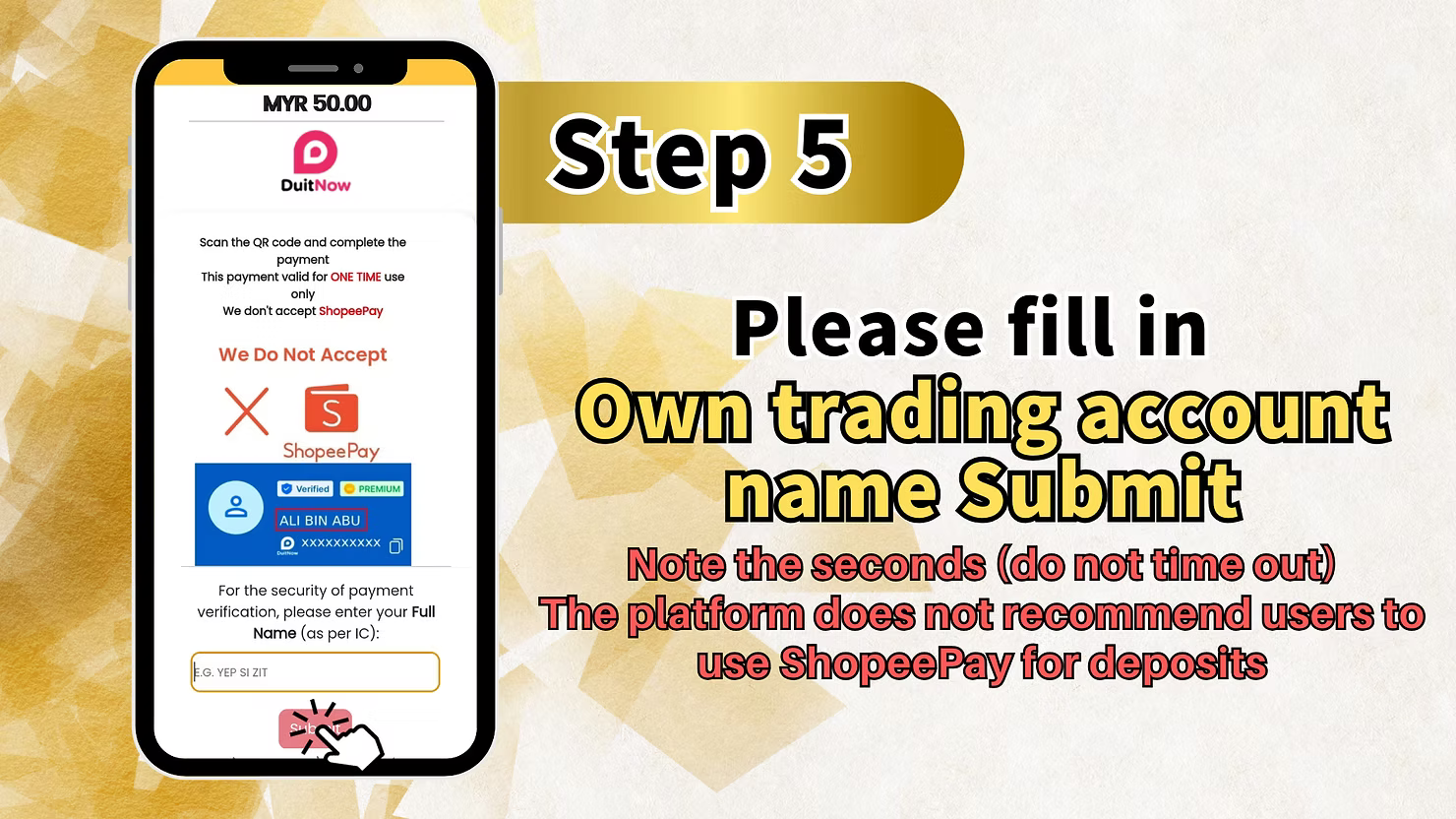
Please note: The platform does not recommend users to use ShopeePay for making deposits at LUCKY TOWN PLUS. For the best and most reliable deposit experience, please use UPay or Go Pay.
Step-by-Step Guide to Duit Now Top Up at LUCKY TOWN PLUS

Step 1: Access Your LUCKY TOWN PLUS Account
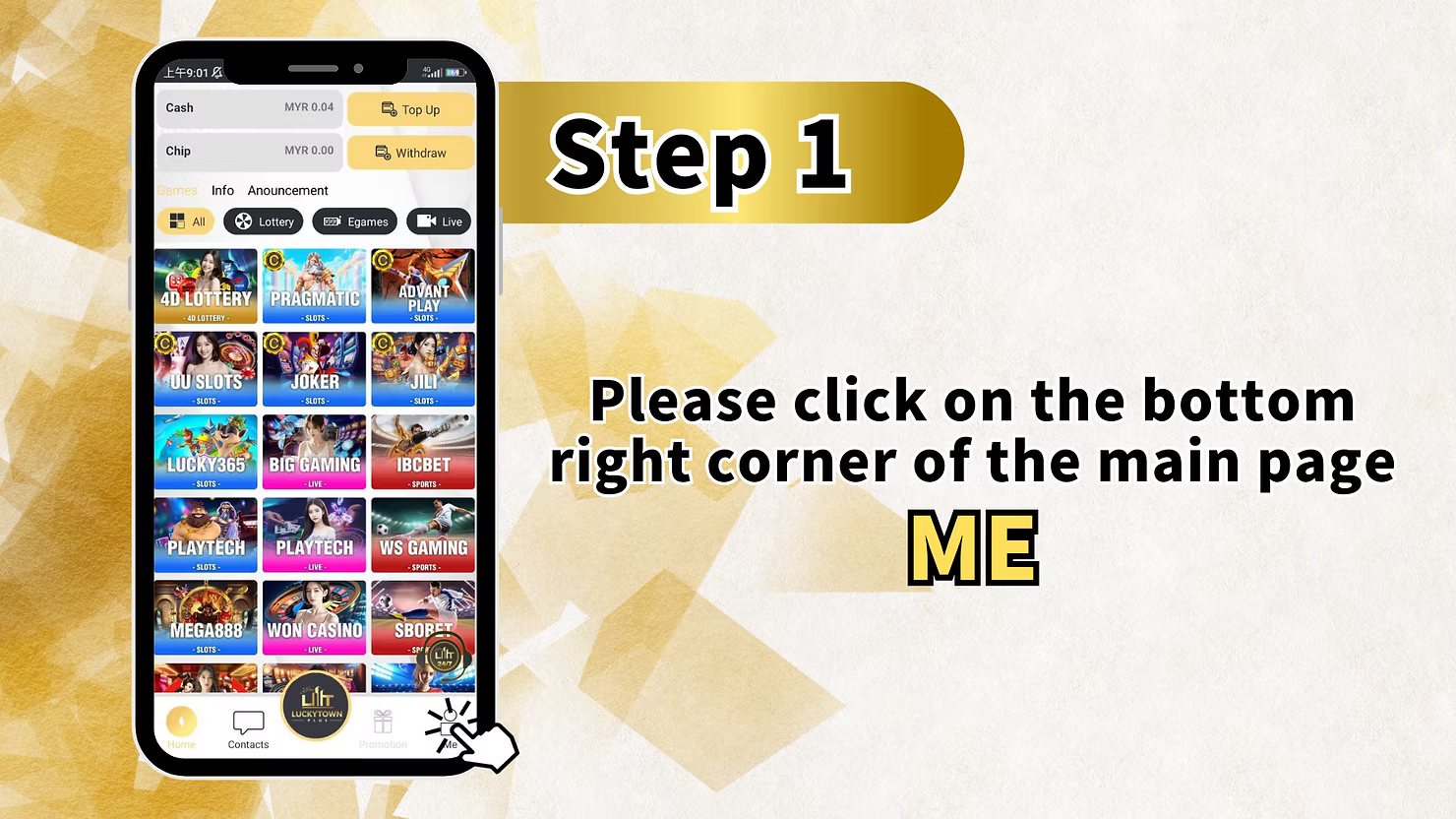
Tap on "ME" in the Bottom Right Corner
Open the LUCKY TOWN PLUS app on your mobile device. On the main page, locate the bottom right corner and tap on "ME" to access your personal account dashboard. This is your central hub for all account management tasks.
Step 2: Navigate to Deposit/Withdrawal
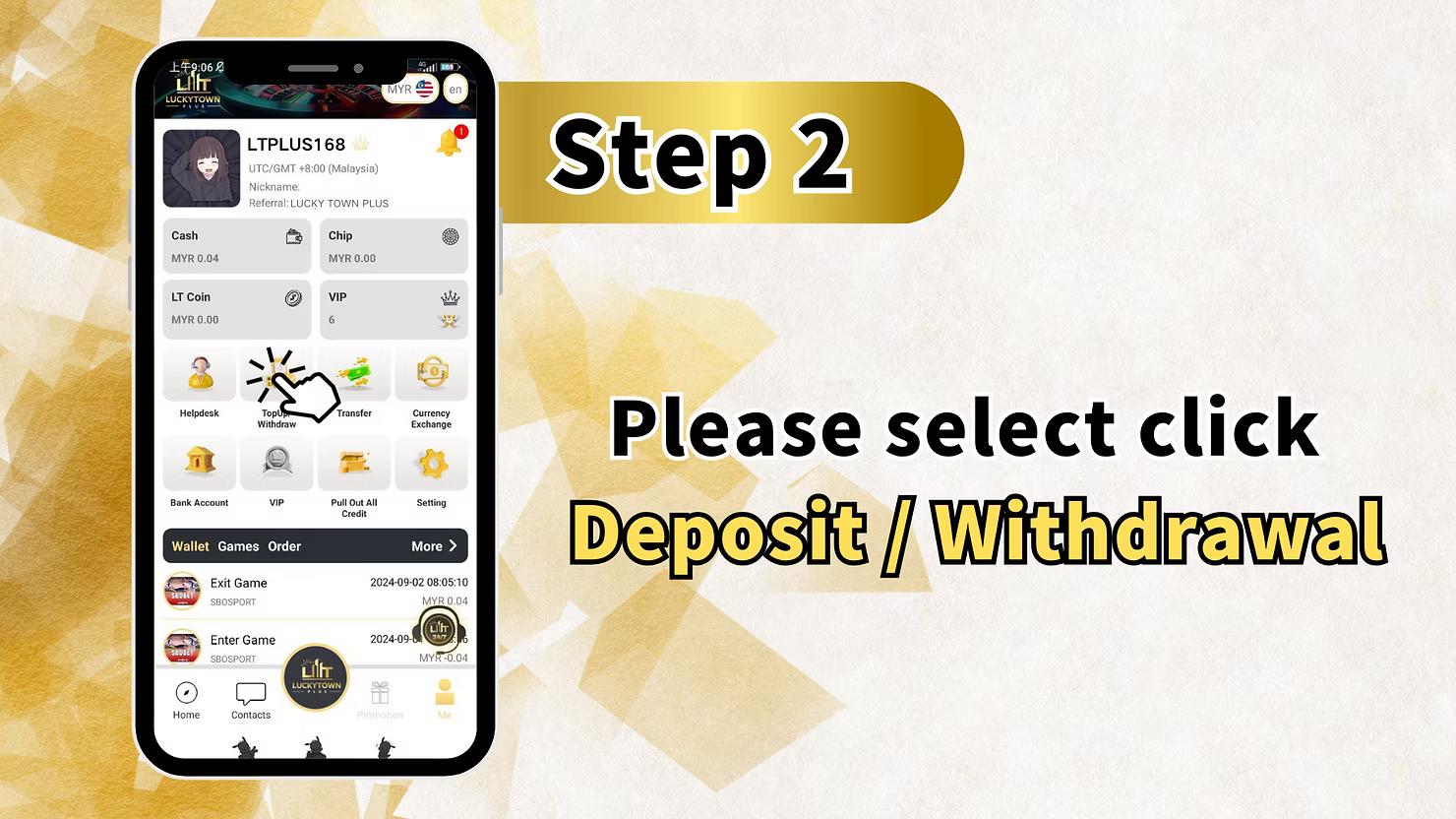
Select "Deposit / Withdrawal" from the Menu
From the "ME" menu, tap on "Deposit / Withdrawal". This will take you to the funds management page, where you can choose to top up or withdraw funds from your LUCKY TOWN PLUS account.
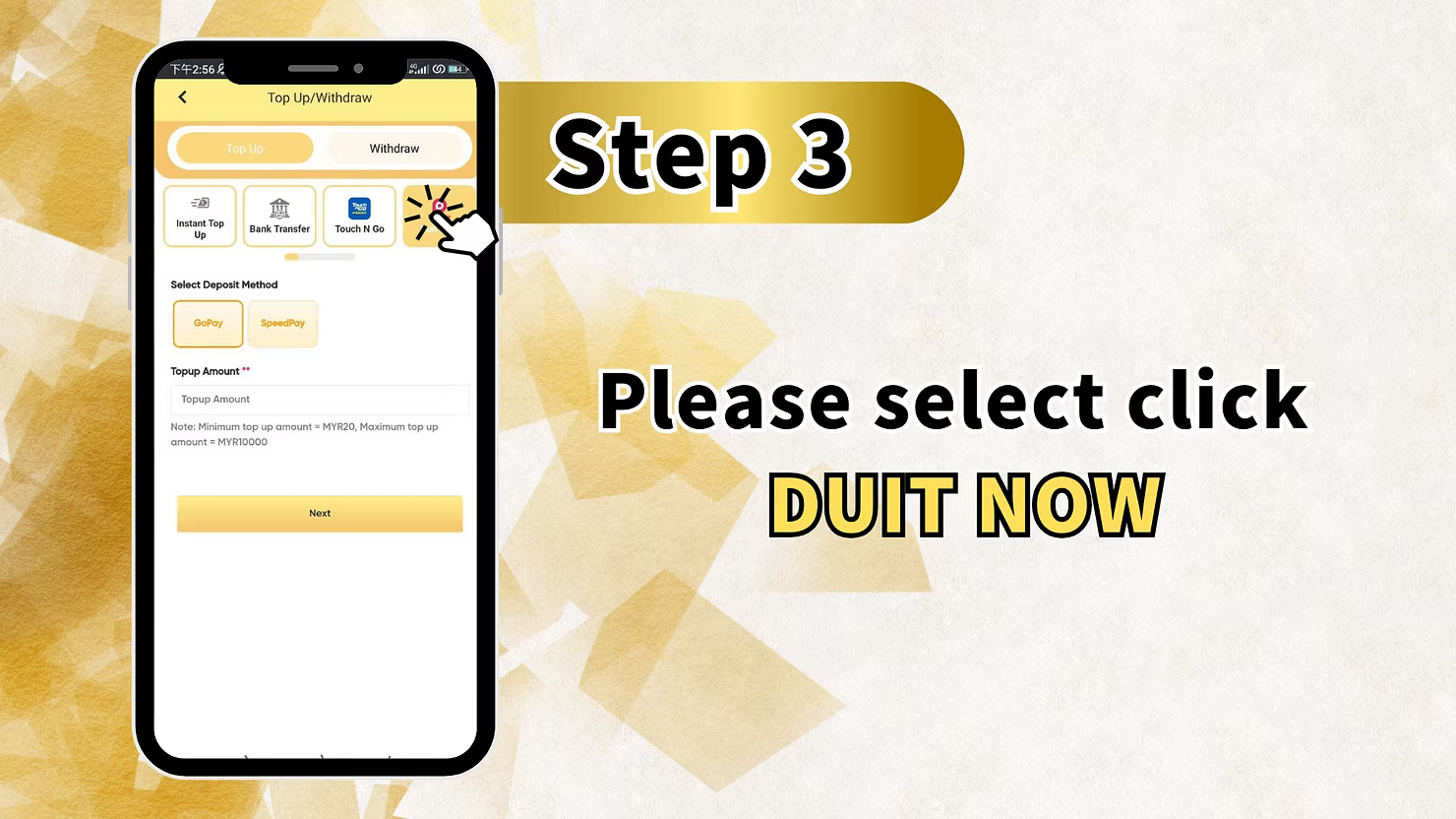
Step 3: Select Duit Now and Your Preferred Provider
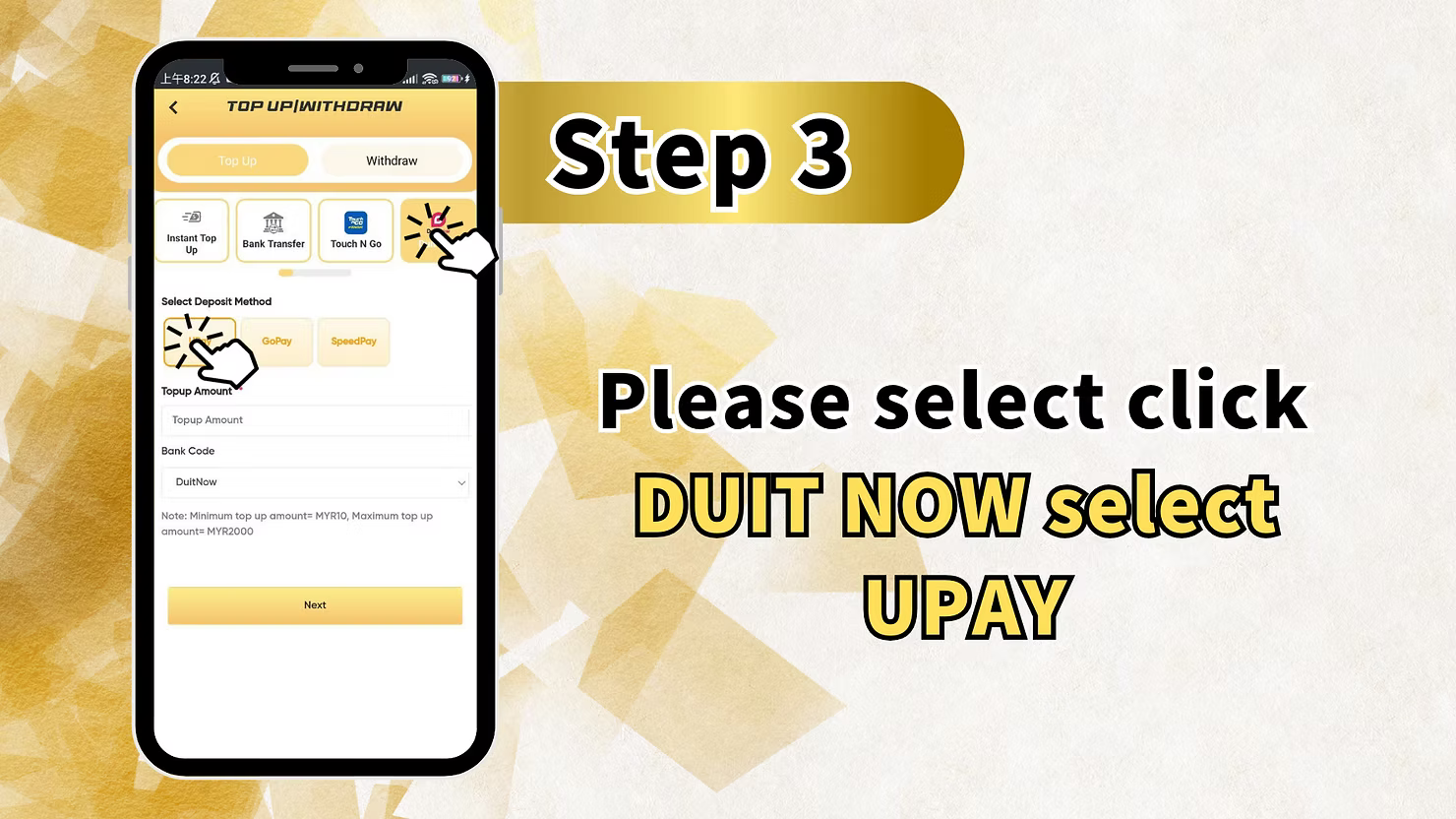
Choose the Duit Now Option
On the deposit methods page, select "DUIT NOW". You will then be prompted to choose your preferred payment provider for the transaction:
- UPay – Select this option for UPay Duit Now deposits.
- Go Pay – Select this option for Go Pay Duit Now deposits.
Make your selection based on which e-wallet or payment app you have readily available and wish to use.
Step 4: Enter Your Deposit Amount
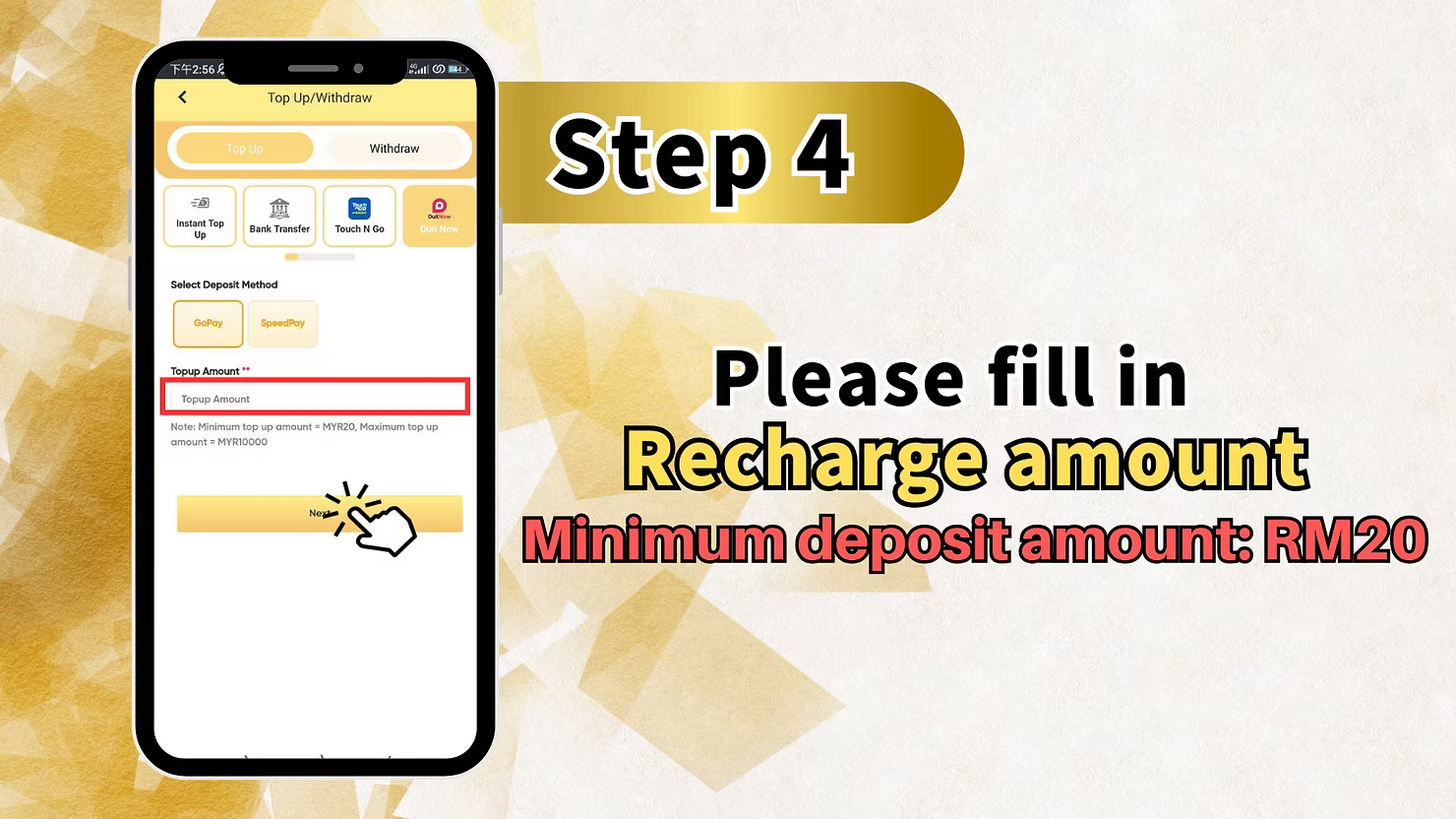
Fill in the Recharge Amount
Enter the amount you wish to deposit in the "Recharge amount" field. Please carefully note the requirements for LUCKY TOWN PLUS:
- Minimum deposit amount: RM20.
- Deposits below RM20 cannot be processed.
For Go Pay Users – Additional Step at LUCKY TOWN PLUS
If you are using Go Pay, you may also need to fill in your "Own trading account name" or similar identifying information. Please ensure this information is entered accurately to avoid any processing delays.
Complete Any Required Recharge Details
Fill in any additional "Recharge details" fields as required by the LUCKY TOWN PLUS deposit form. Double-check all the information you have entered before proceeding to the next step.
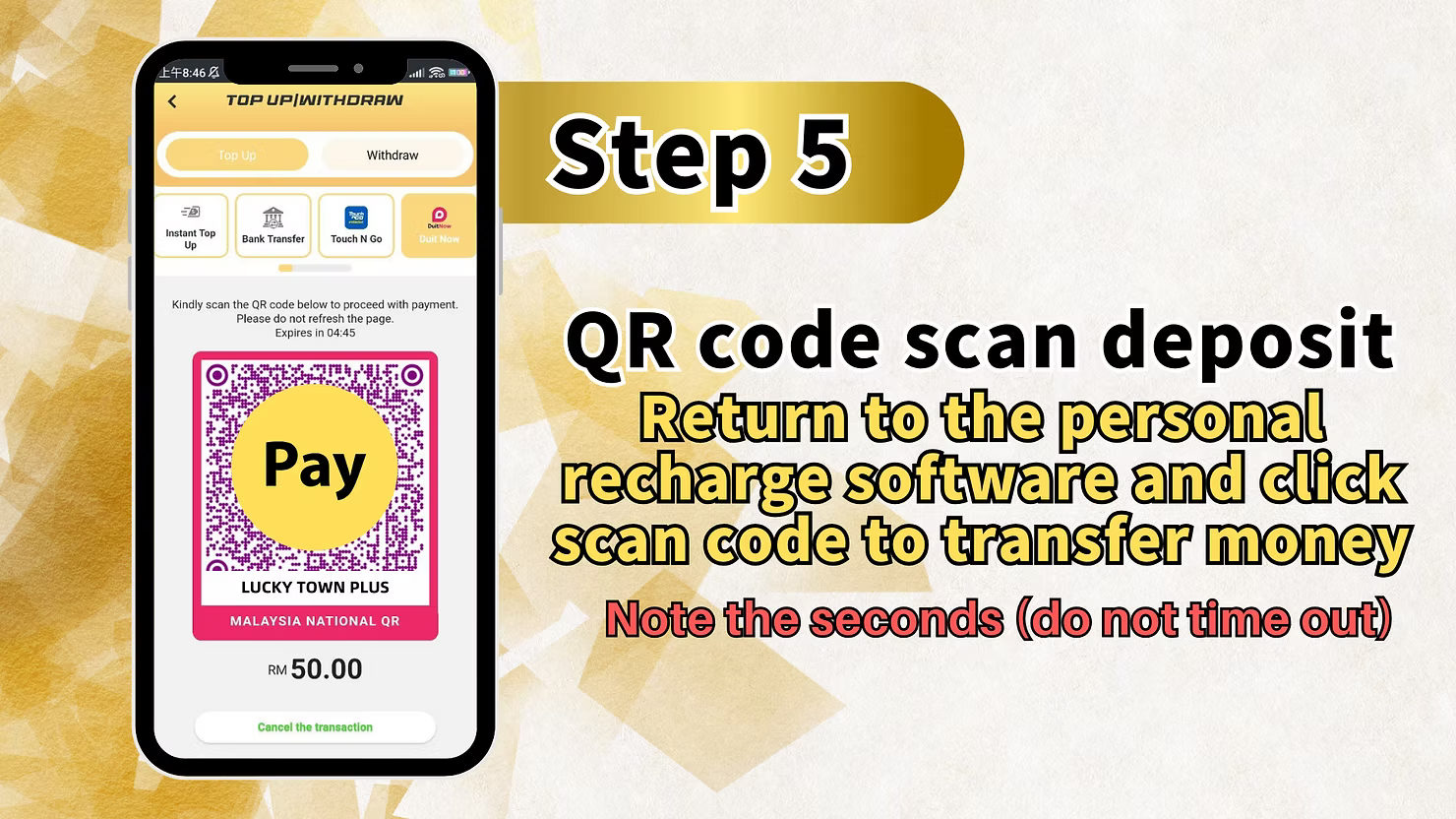
Step 5: Scan the QR Code for Payment
LUCKY TOWN PLUS Displays Unique QR Code
After submitting your deposit details, LUCKY TOWN PLUS will display a unique QR code specifically generated for your transaction. This QR code is linked directly to your deposit request.
Scan QR Code with Your Payment App
Open your preferred payment app (UPay, Go Pay, or other Duit Now-compatible app) on your mobile device. Use the app's built-in scan function to scan the QR code displayed on the LUCKY TOWN PLUS screen.
Complete the Transfer in Your Payment App
Follow your payment app's instructions carefully to complete the transfer of the exact deposit amount you specified. Verify all transaction details before confirming the payment.
Important: Act Quickly to Avoid QR Code Timeout
Note the seconds – QR codes often have a limited validity period. Please complete the scan and transfer promptly to avoid the QR code timing out. If the code expires, you will need to generate a new one by restarting the deposit process at LUCKY TOWN PLUS.
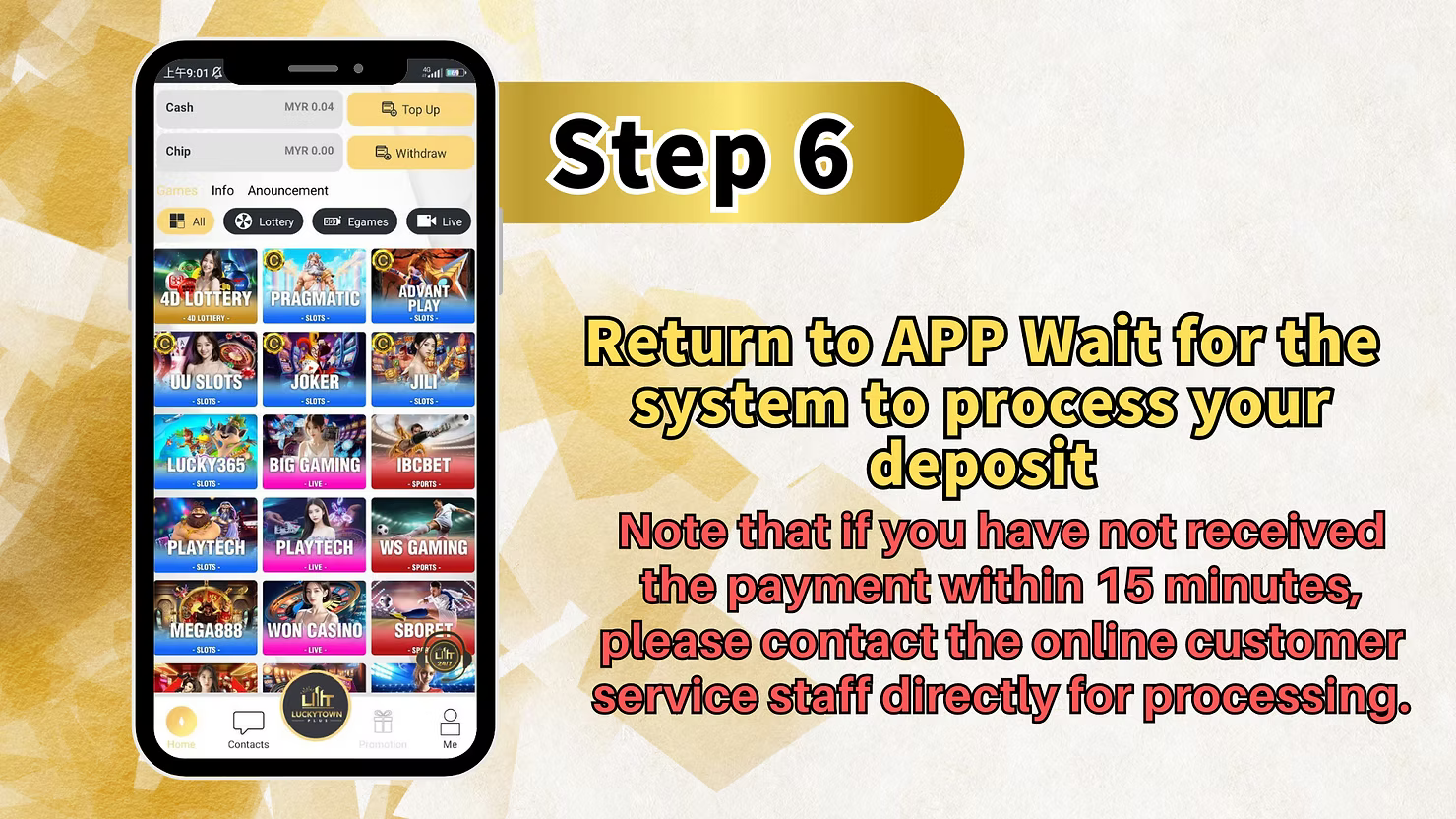
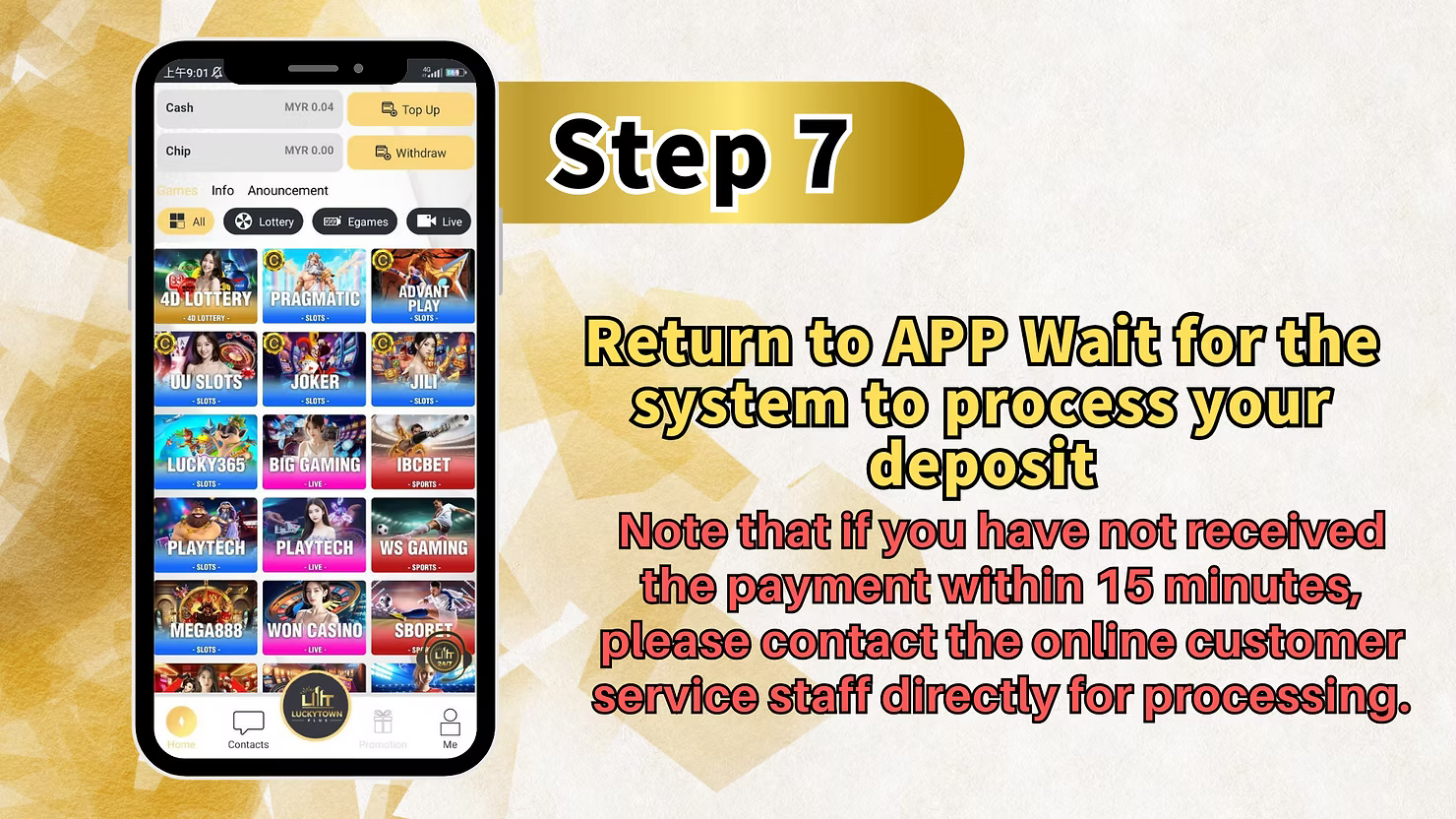
Step 6: Return to LUCKY TOWN PLUS and Wait for Processing
Wait for System Processing
After successfully completing the payment in your app, return to the LUCKY TOWN PLUS app. The system will automatically begin processing your deposit.
Standard Processing Time
Please wait patiently while the system processes your deposit. Most transactions are completed within minutes.
If Payment Is Not Received Within 15 Minutes
Note: If you have not received confirmation of your payment being credited within 15 minutes, please contact the online customer service staff directly for assistance. Our dedicated support team is ready to help resolve any deposit issues promptly.
Summary of Duit Now Top Up Steps at LUCKY TOWN PLUS
Quick Reference Checklist for LUCKY TOWN PLUS Members
Here is a quick summary of the Duit Now top-up process at LUCKY TOWN PLUS for your easy reference:
For UPay Duit Now:
1. Tap ME (bottom right).
2. Select Deposit / Withdrawal.
3. Choose DUIT NOW and
select UPay.
4. Enter recharge amount (minimum RM20).
5. Scan the QR code and complete the transfer
promptly (avoid timeout).
6. Return to the app and wait for processing (up to 15 minutes).
For Go Pay Duit Now:
1. Tap ME (bottom right).
2. Select Deposit / Withdrawal.
3. Choose DUIT NOW
and select Go Pay.
4. Enter recharge amount (minimum RM20).
5. Fill in your trading account name if
required.
6. Scan the QR code and complete the transfer promptly (avoid timeout).
7. Return to the app
and wait for processing (up to 15 minutes).
Important Notes for Successful Duit Now Top Up at LUCKY TOWN PLUS
Minimum Deposit Amount is Strict
All Duit Now deposits at LUCKY TOWN PLUS require a minimum of RM20. Transactions submitted for amounts below this threshold cannot be processed.
Always Avoid QR Code Timeout
QR codes generated for your deposit have a limited validity period. When you see the QR code, complete your scan and transfer promptly. Pay close attention to any countdown timer displayed on the screen.
ShopeePay is Not Recommended for Deposits
LUCKY TOWN PLUS does not recommend using ShopeePay for making deposits. For the most reliable and efficient experience, please use UPay or Go Pay.
Contact Support Promptly If Needed
If your deposit is not credited to your account within 15 minutes, do not hesitate to contact LUCKY TOWN PLUS customer support. Our team is available to investigate and resolve any issues quickly.
Frequently Asked Questions About Duit Now Top Up at LUCKY TOWN PLUS
What is Duit Now?
Duit Now is a real-time payment platform in Malaysia that enables instant fund transfers and QR code payments. LUCKY TOWN PLUS accepts Duit Now payments through UPay and Go Pay for convenient and fast deposits.
What is the minimum deposit amount for Duit Now?
The minimum deposit amount for Duit Now transactions at LUCKY TOWN PLUS is RM20.
How long does Duit Now deposit processing take?
Most deposits are processed within minutes. If your payment has not been credited after 15 minutes, please contact LUCKY TOWN PLUS customer support for assistance.
What should I do if my Duit Now QR code expires?
If your QR code times out, you can simply generate a new one by starting the deposit process again from the beginning. Be sure to complete the scan and transfer promptly the second time to avoid another timeout.
Can I use ShopeePay for Duit Now deposits at LUCKY TOWN PLUS?
LUCKY TOWN PLUS does not recommend using ShopeePay for deposits. For the best and most reliable experience, please use UPay or Go Pay.
What additional information might I need for Go Pay deposits?
For Go Pay deposits, you may be required to enter your "trading account name" or a similar form of identification. Please follow the on-screen prompts in the LUCKY TOWN PLUS app carefully and provide accurate information.
What should I do if my deposit isn't credited after 15 minutes?
If your deposit is not credited to your LUCKY TOWN PLUS account within 15 minutes of completing the payment, please contact our online customer service immediately. Our support team will investigate and resolve the issue for you.
Is Duit Now a secure method for deposits at LUCKY TOWN PLUS?
Yes, Duit Now is a secure and widely used payment method in Malaysia. Combined with LUCKY TOWN PLUS's own security measures, your transactions are well-protected. Always ensure you are using the official LUCKY TOWN PLUS app and following the proper procedures.
Can I make multiple Duit Now deposits?
Yes, you can make multiple deposits using Duit Now. Each transaction will follow the same simple process and will have its own unique, single-use QR code generated by LUCKY TOWN PLUS.
Top Up with Duit Now at LUCKY TOWN PLUS Today!
Ready to play? Follow our comprehensive step-by-step Duit Now guide to top up your LUCKY TOWN PLUS account instantly. Enjoy fast QR code deposits, a low minimum of RM20, and quick processing. Choose UPay or Go Pay and start enjoying all your favorite games in just minutes!
Top Up with Duit Now at LUCKY TOWN PLUS