

Share the Excitement and Earn Valuable Rewards
At LUCKY TOWN PLUS, we believe that great experiences are even better when shared. Our Recommend Friends program allows you to invite your friends to join the platform and enjoy all the exciting games, lottery options, and sports betting we offer. As a thank you, you'll earn rewards for every friend who joins through your personal referral, strengthening the LUCKY TOWN PLUS community.
Multiple Convenient Ways to Share Your Referral
LUCKY TOWN PLUS offers several flexible methods to recommend friends. You can save your unique QR code, share it directly on social media, or copy your personal referral link. Choose the method that works best for you and start inviting friends to the LUCKY TOWN PLUS family today.
Step-by-Step Guide to Recommend Friends at LUCKY TOWN PLUS

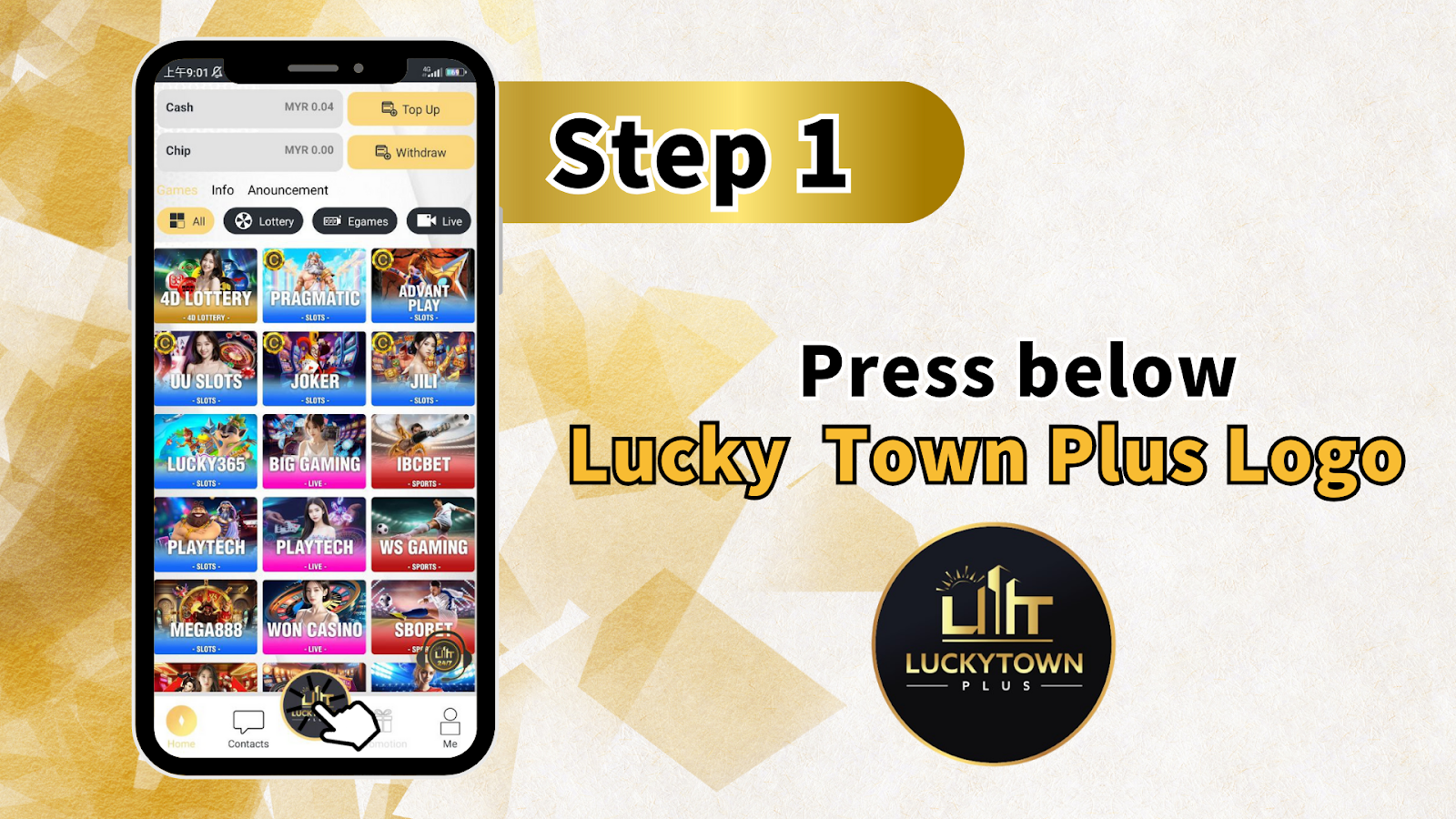
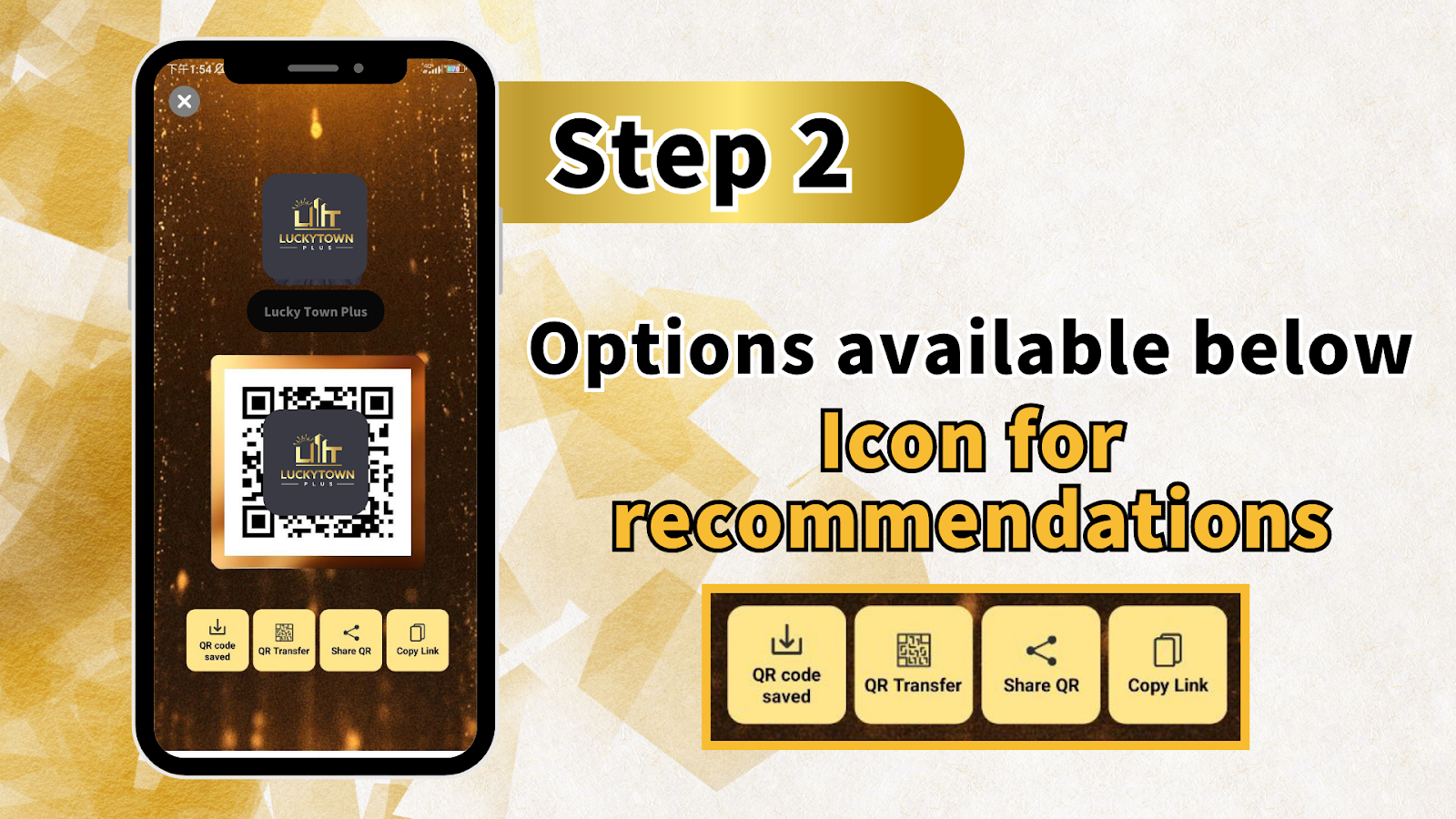
Step 1: Access the Recommend Friends Feature
Locate the Lucky Town Plus Logo
To begin, press the Lucky Town Plus Logo located at the top of the app or website. This action will open the main menu, where you can find various account options.
Navigate to the Recommend Friends Section
From the menu, look for the option labeled Recommend Friends or Referral. Selecting this will take you to the dedicated referral page, where you can access your unique QR code and personal referral link.
Understanding Your LUCKY TOWN PLUS Dashboard Before Referring
Left Sidebar Overview for LUCKY TOWN PLUS Members
Before you start referring friends, take a moment to familiarize yourself with the left sidebar options on your LUCKY TOWN PLUS dashboard. These tools help you manage your account effectively.
- Cash: View your current cash balance available for play.
- Chip: Access your chip balance, used for specific games on the platform.
- Info: Check important account information and details.
- Announcement: Read the latest platform news and updates from LUCKY TOWN PLUS.
Top Bar Information at LUCKY TOWN PLUS
The top bar of your dashboard displays your current balance and provides quick action buttons for easy account management.
- MYR 0.04 (example): Your current account balance is shown here.
- Top Up: Instantly add funds to your LUCKY TOWN PLUS account.
- Withdraw: Securely withdraw your winnings.
- Live: Get quick access to live casino games.
Main Content Area – Games Your Friends Can Enjoy
The main content area showcases the wide variety of games available at LUCKY TOWN PLUS that your friends can enjoy after registering through your referral. This diverse selection is a great selling point when you invite them.
- 4D LOTTERY: All major lottery options including Magnum, Damacai, TOTO, and more.
- PRAGMATIC SLOTS: Popular and engaging slot games from Pragmatic Play.
- ADVANT PLAY SLOTS: A collection of exciting slot titles.
- UJ SLOTS & JOKER SLOTS: Various slot options from leading providers.
- JILI SLOTS & LUCKY365 SLOTS: More great slot gaming choices.
- BIG GAMING LIVE: Immersive live casino games with real dealers.
- IBC BET SPORTS: A comprehensive sports betting platform.
- PLAYTECH SLOTS: High-quality slot games from Playtech.
- WON CASINO LIVE: Another premium live casino experience.
- SBOBET LIVE: Access to SBOBET's live betting markets.
Bottom Bar Navigation at LUCKY TOWN PLUS
The bottom bar of the interface provides quick access to essential support and account features.
- Contacts: Easily reach out to LUCKY TOWN PLUS customer support for any assistance.
- Me: Access your personal profile and account settings.
Step 2: Access Your Unique Referral QR Code and Link
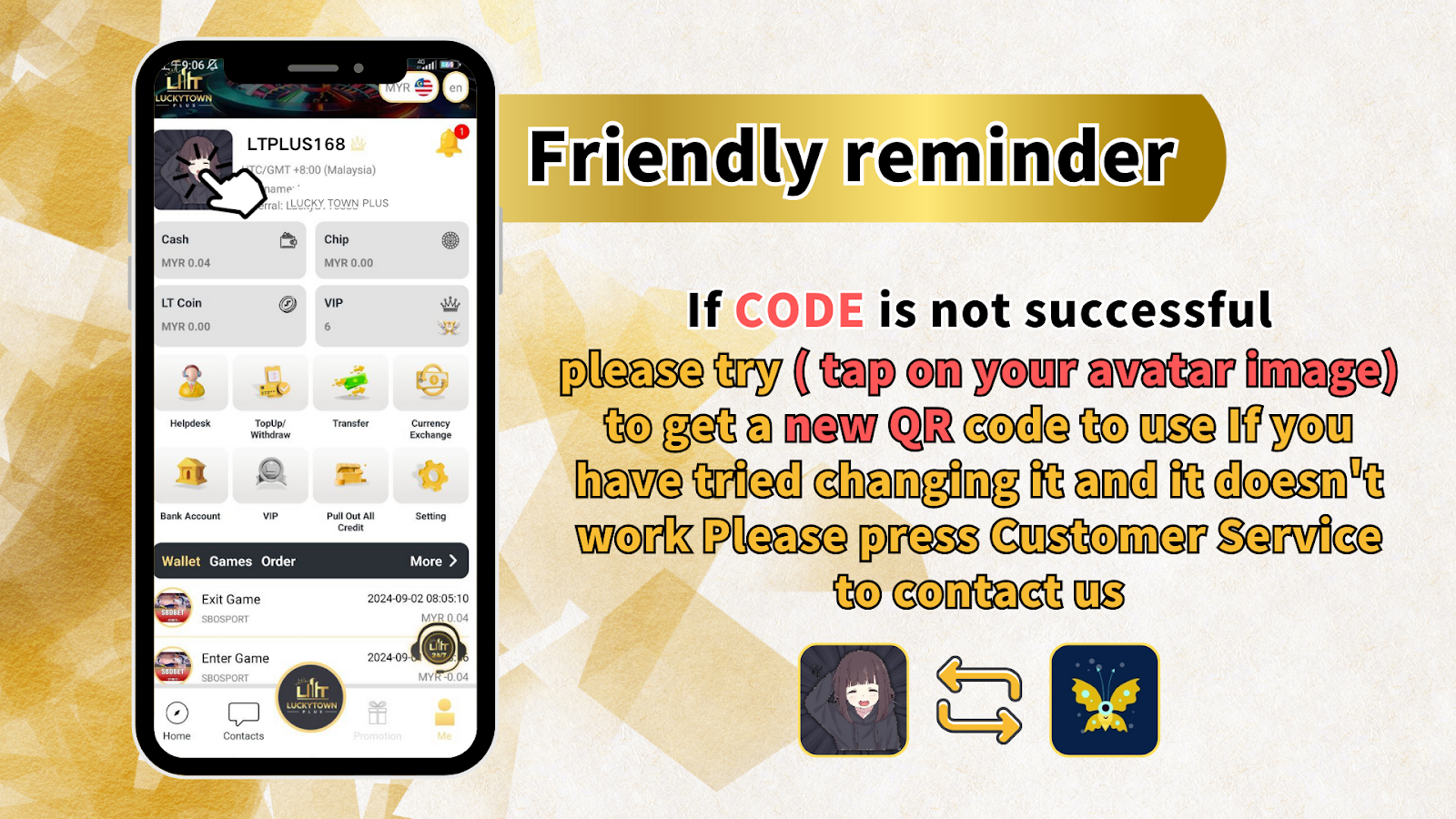
Generate Your Personal Referral Code at LUCKY TOWN PLUS
Once you are on the Recommend Friends page, LUCKY TOWN PLUS will automatically display your unique referral QR code and link. This code is specifically and permanently tied to your account, so any friend who registers using it will be correctly tracked as your referral.
QR Code Saved Confirmation
You will see a confirmation message, such as "QR code saved," when you successfully save your QR code to your device. Your full range of referral options will be clearly displayed below the QR code for easy access and sharing.
Step 3: Choose Your Preferred Referral Method at LUCKY TOWN PLUS
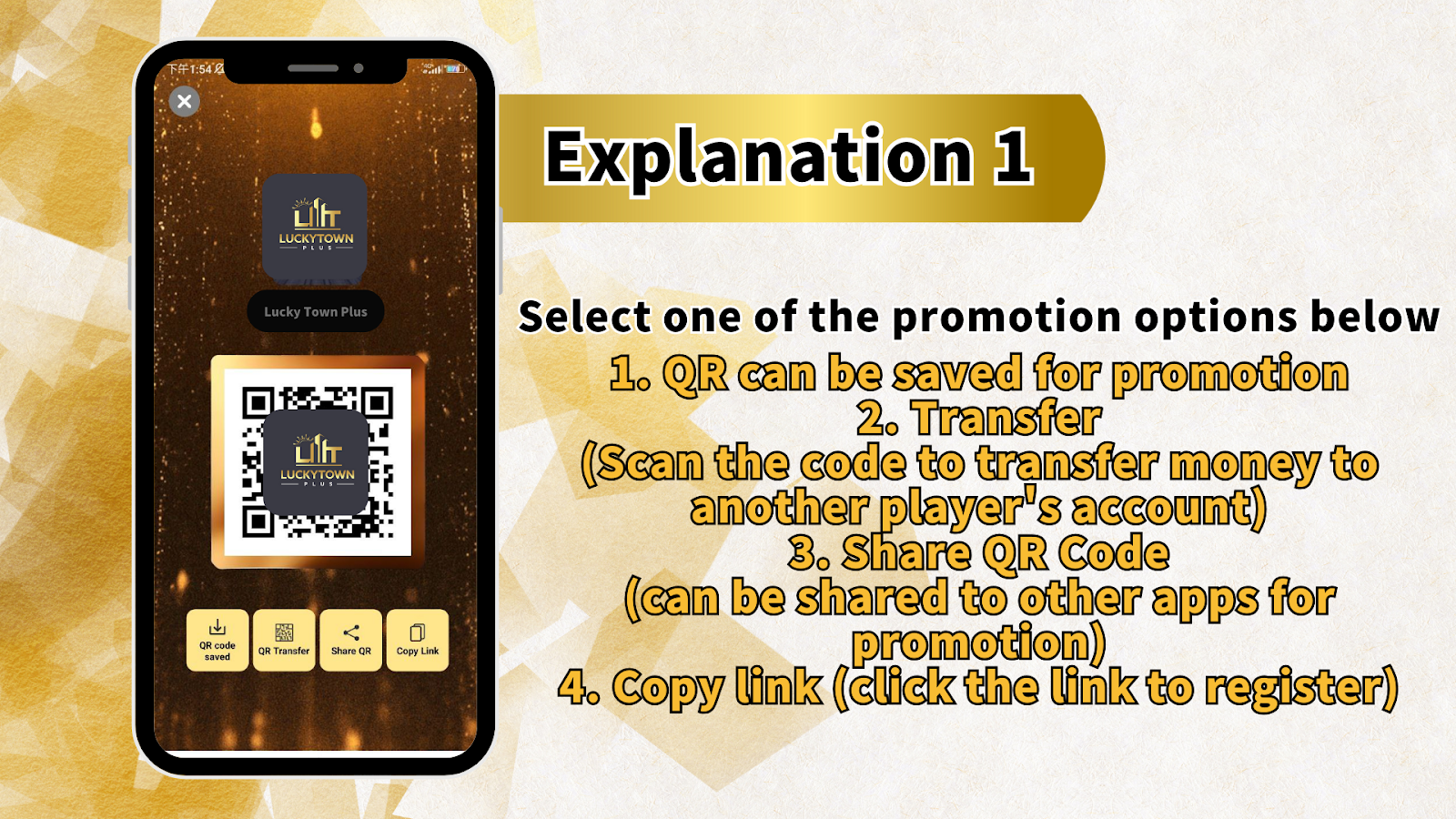
Option 1: Save QR Code
Select the "QR Transfer" or save option to download your unique QR code image to your device. You can then share this image with friends through any messaging app, email, or by showing it to them in person. This method is perfect for face-to-face referrals.
Option 2: Share QR Code
Choose the "Share QR" option to directly share your QR code through other apps installed on your device. LUCKY TOWN PLUS integrates with your phone's sharing features, allowing you to send your code via WhatsApp, Telegram, Facebook, Messenger, email, and more.
Option 3: Copy Link
Select "Copy Link" to copy your unique referral link to your clipboard. You can then paste this link anywhere—in messages, social media posts, emails, or websites. When friends click the link, they will be directed to the LUCKY TOWN PLUS registration page with your referral automatically applied.
Option 4: Transfer
The "Transfer" option allows you to scan another player's QR code to transfer funds directly to their account. This is a useful feature if you wish to send credits to a friend who has already joined LUCKY TOWN PLUS.
Step 4: Promote and Share with Your Friends
Share on Social Media Platforms
Use the integrated share feature to post your QR code or referral link on social media like Facebook, Instagram, or Twitter. Let your followers know why you enjoy LUCKY TOWN PLUS and invite them to join the community.
Send Direct Personal Messages
Send your referral link or QR code directly to friends who might be interested in lottery, slots, live casino, or sports betting. A personal recommendation from you is often the most effective way to encourage them to join LUCKY TOWN PLUS.
In-Person Sharing
Save your QR code to your phone and simply show it to friends when you are together. They can scan it immediately with their device and register on the spot, making the process quick and effortless.
Troubleshooting: If Your Referral Code Is Not Successful
Try Refreshing Your QR Code
If your referral CODE is not working, LUCKY TOWN PLUS provides a simple solution. Tap on your avatar image within the Recommend Friends section to generate a fresh QR code. This action often resolves any temporary issues with the previous code.
Multiple Attempts May Be Necessary
If you have tried changing your QR code multiple times and it still does not work, please do not worry. The platform has a built-in support process for this situation to ensure you can successfully refer friends.
Contact LUCKY TOWN PLUS Customer Service
If refreshing your QR code does not resolve the issue, please press the Customer Service button to contact our dedicated support team. LUCKY TOWN PLUS customer service representatives are available 24/7 to assist you with any referral problems and ensure you can successfully invite your friends to join.
Frequently Asked Questions About Referring Friends at LUCKY TOWN PLUS
How do I know when a friend registers using my code?
LUCKY TOWN PLUS automatically tracks all referrals made through your unique QR code and link. You can check your referral history and status in the Recommend Friends section, or contact customer support for detailed updates on your successful referrals.
Can I use both the QR code and the referral link?
Yes, absolutely! Your unique referral code works with both the QR code and the referral link. You are free to use whichever method is most convenient for each friend you invite to LUCKY TOWN PLUS.
What if my friend has trouble scanning the QR code?
If your friend encounters difficulty scanning the QR code, simply use the "Copy Link" option and send them the referral link directly. They can click the link to register without needing to scan anything, and your referral will still be applied.
Is there a limit to how many friends I can refer?
LUCKY TOWN PLUS welcomes you to refer as many friends as you like. There is no set limit to the number of referrals you can make, so you can continue earning rewards by expanding the LUCKY TOWN PLUS community.
What rewards do I get for referring friends?
LUCKY TOWN PLUS offers attractive rewards for successful referrals. For the most up-to-date information on current referral bonuses and the specific rewards structure, please check the main promotions page or contact our customer support team.
Can I refer friends who are already LUCKY TOWN PLUS members?
The referral program is specifically designed for inviting new members to join LUCKY TOWN PLUS. Friends who are already registered with the platform cannot be referred again through this program.
How do I get a new QR code if I need to refresh it?
Simply tap on your avatar image in the Recommend Friends section, and a fresh QR code will be generated for you. This is the recommended method for obtaining a new referral code at LUCKY TOWN PLUS.
Start Referring Friends to LUCKY TOWN PLUS Today!
Now that you know exactly how to recommend friends at LUCKY TOWN PLUS, it's time to start sharing. Use your unique QR code or referral link to invite your friends and start earning valuable rewards. The more friends you invite, the more you earn within the LUCKY TOWN PLUS community!
Refer Friends at LUCKY TOWN PLUS